SwingU: Golf GPS Range Finder
- 4.6
- Rating
- 1.00M
- Installs
- Free
- Price

 Analysis by App-foxy
I approached SwingU: Golf GPS Range Finder as a first-time user would: looking for a practical way to get more useful information during a round without carrying a separate rangefinder, notebook, and handicap tool. It is a free sports app from Swing by Swing Golf, LLC, aimed at golfers who want several parts of their game organized in one place. The idea is appealing, but the real question is whether that combination feels helpful on the course or simply gives you more screens to manage.
After spending time with its range-finding, scoring, statistics, handicap, and watch-oriented tools, my impression is that SwingU works best when you treat it as a round companion rather than a replacement for every piece of golf equipment. It can help me make a quicker club decision, keep a cleaner record of a round, and review patterns later. It is less convincing for someone who wants the absolute simplest possible distance display or who dislikes entering information while playing.
What to expect before your first round
The app sits in the sports category and has been available since late 2010, so it is not a new experiment built around a single fashionable feature. Its broad purpose is to bring several familiar golf utilities together: a GPS range finder, scorecard, handicap support, statistics, and a watch app. That breadth is its main reason to exist. Instead of switching between a basic distance tool and a separate scoring method, I can keep the round in one golfing workspace.
You May Also Like

 Blood Strike: 2.5 Anniversary
Blood Strike’s Loadouts Turn Every Drop Into a Tactical Gamble
A close look at Blood Strike’s custom loadouts: how fast access to signature weapons reshapes its battle royale rhythm, rewards preparation, and narrows the gap between fights.

 Pandora - Music & Podcasts
Pandora’s Music Is Easy to Start, but Harder to Recover
Pandora’s strength is its low-effort path from a seed to a station. Its weak spot is how much confidence it asks you to place in connection, setup, and quiet recovery.

 8 Ball Pool
 Is Built on Rivalries, Rematches, and Routine
A close look at the rivalries, rematches, shared routines, and unanswered safety questions that turn a quick pool match into a persistent mobile community.

 Samsung Music
’s Quiet Strength Is Playing What You Already Own
Its reach comes less from spectacle than from dependable access to a personal library. That simplicity is both the app’s strongest retention engine and its ceiling.

 AccuWeather: Weather Radar
AccuWeather Review: A Quick, Clear Forecast for Everyday Decisions
For everyday plans, the best forecast is the one you can understand quickly. AccuWeather makes rain timing, radar, and local conditions easy to act on, with a few trade-offs.

 Hill Climb Racing
Why Hill Climb Racing Still Turns Crashes Into One More Run
A tiny car, a bumpy hill and one more upgrade: Hill Climb Racing keeps resurfacing because its simple chaos makes every near-miss feel personal.
More From Our News Desk



SwingU is free to install and is rated for Everyone. It has attracted over one million installs, with an average rating of 4.6 from around fifty-four thousand ratings and roughly thirteen thousand written reviews. Those figures suggest that the app has found a substantial audience, but they should not be mistaken for a guarantee that every golfer will enjoy its workflow. Golfers differ greatly in how much information they want while standing over a shot.
The first useful expectation to set is that GPS distance information is only as valuable as the decision you make with it. A number on a screen does not account for wind, elevation changes, lie, temperature, confidence, or the quality of your strike. I found the app more useful when I used it to narrow a choice rather than to pretend it could select the perfect club for me.
The second expectation concerns attention. A scorecard and statistics tool can improve your records, but only if you enter information consistently. If you regularly forget whether a missed green came from a poor approach or a difficult recovery, later analysis will be less meaningful. SwingU rewards a golfer who develops a small routine, not someone who opens it only when a difficult shot appears.
The developer offers the app without an upfront charge, while optional in-app purchases range from $3.99 to $199.99 per item. That wide range is worth noticing before you commit to anything. I would begin with the free experience, learn which parts of the app I actually use, and only then consider whether an optional purchase solves a real problem for my game.
Who will get the most from it
I see the strongest fit for recreational golfers who play often enough to benefit from a running history but do not want to build their own spreadsheet. It also suits a player who wants one place to record scores and inspect tendencies after a round. A newer golfer may appreciate having a structured scorecard, while a more experienced player may value the chance to connect decisions on the course with later statistics.
It is not automatically the best choice for a golfer who already owns a dedicated rangefinder and is satisfied with a paper scorecard. In that situation, the extra tracking can feel like work rather than an improvement. I would also hesitate to recommend it to someone who wants a completely hands-off experience, because scoring and statistics are only useful when the player supplies dependable information.
Setting up a useful routine instead of just opening the app
My advice for a first launch is to avoid trying to understand every tool at once. Start by deciding what you want from the next round. If your immediate goal is distance assistance, begin there. If your main goal is to stop losing your score history, start with the scorecard. The app covers enough ground that a narrow first objective makes the experience much less confusing.
Before playing, make sure the phone is ready for outdoor use and that you are comfortable viewing the screen quickly. I prefer to make the app part of my pre-round routine rather than waiting until I am already on the first tee. That gives me time to identify the scoring flow and avoids learning the interface while a group is waiting behind me.
A useful setup habit is to decide in advance when you will record information. I would update the scorecard after each hole, not after several holes have blurred together. For statistics, I would use the same standard every time. For example, I would not record detailed information on one round and only total scores on the next if I expect to compare them later. Consistency matters more than collecting every possible detail.
The watch support can be valuable for golfers who prefer not to keep taking out a phone, but I would treat it as an extension of the same routine rather than a separate system. The benefit is convenience during a round; the trade-off is that a smaller display may require more deliberate glances. If you are already comfortable using a phone, there is no need to force the watch workflow simply because it exists.
One practical tip is to separate “playing information” from “review information.” During a shot, I want the shortest path to a distance and a decision. After the round, I have more patience for statistics and handicap-related review. Trying to study trends while I am still playing makes the round slower and distracts me from the actual shot.
Your first meaningful success on the course
The first success I would aim for is not a perfect statistical profile. It is completing one hole with a repeatable process: check the available distance information, choose a conservative target, record the score, and move on. That sounds simple, but it proves that the app is helping rather than interrupting.
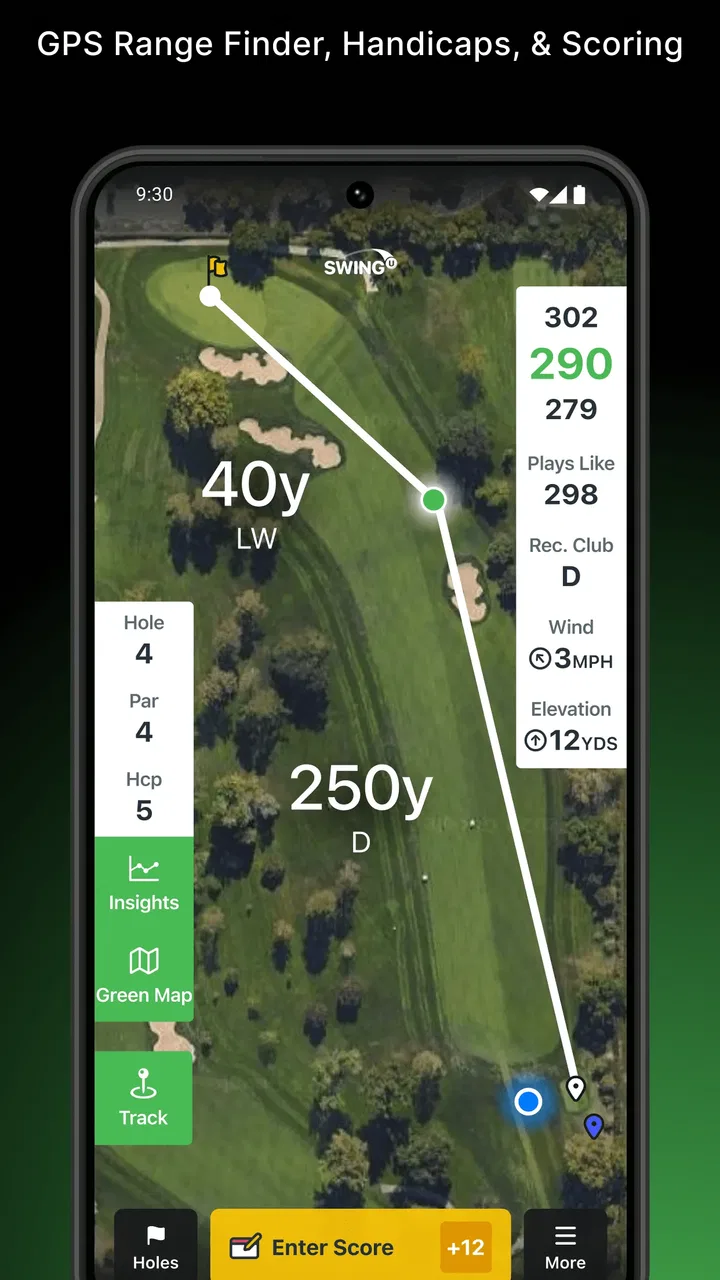
Imagine arriving at a par four with an awkward approach. I would use the range-finder function to establish the basic distance, then consider the lie and the trouble around the green before choosing a club. After the hole, I would enter the result immediately. The useful outcome is not merely seeing a number; it is creating a small record that connects the decision, the shot, and the final score.
For a first round, I would resist the temptation to chase every statistic. If I spend too much time entering details, I may rush the next shot or annoy playing partners. A clean scorecard with reliable entries is more valuable than a complicated record filled with guesses. Once that routine feels natural, I can add more detail on later rounds.
This is also where SwingU can be more useful than a basic distance-only app. A simple range finder may be quicker for a single shot, but it does not necessarily encourage me to preserve the context of the round. SwingU’s value appears when the immediate distance tool and the longer-term record support each other.
At the same time, a dedicated rangefinder can still be better for a golfer whose only priority is fast, uncomplicated yardage. Hardware may feel more direct, especially in bright sunlight or when the phone is inconvenient to handle. SwingU makes the most sense when you want distance assistance together with scoring and review, not when you want to imitate a single-purpose device as closely as possible.
Where first-time users may hesitate
The biggest source of confusion is likely to be the app’s range of functions. A golfer opening it for the first time may see a product that appears to promise an entire management system rather than one focused tool. My solution is to ignore the features that do not serve the current round. You do not need to become an expert in handicap tracking before you can use the scorecard effectively.
Another common misunderstanding is expecting statistics to explain the cause of every bad score automatically. Statistics can show patterns only when the underlying entries are accurate and sufficiently consistent. If I mark a missed green differently from round to round, the resulting trend may be misleading. I would use the statistics as prompts for reflection, not as unquestionable diagnoses.
Handicap information can also create unrealistic expectations. A handicap-related feature is useful for organizing a golfer’s progress and understanding scoring over time, but it does not instantly make a player’s index meaningful after a single casual round. The sensible approach is to keep recording rounds under a consistent method and use the information as part of a longer view of performance.
There is also a practical trade-off between detail and pace. In a relaxed solo round, I may enjoy recording more information. In a busy weekend group, I need to keep the process brief. The app does not remove that judgment. I still have to decide how much attention is appropriate for the situation, and I should be willing to record less rather than hold up the group.
The optional purchase structure deserves careful attention as well. Since the app is free but includes items priced from $3.99 to $199.99, I would not assume that every useful function belongs to the basic experience or that every paid option is necessary. I would first identify the exact limitation I am trying to solve, read the purchase wording carefully, and avoid paying for a broader package simply because it sounds comprehensive.
Small workflows that make the app more useful
My first recommended workflow is the “one decision, one record” method. Before each important approach, use the distance information to choose a target, then record the result after the hole. This creates a link between course management and later review. It is more useful than opening the app randomly because it gives every entry a purpose.
The second is a weekly review rather than a hole-by-hole obsession. After a few rounds, look for a recurring weakness instead of reacting to the most recent disaster. If the records repeatedly point toward trouble on approaches or putting, that is a better practice signal than one unusually poor hole. The app becomes a learning aid when I use its history to choose what to work on next.
The third is to use a conservative data standard. When I am unsure about a detail, I would rather leave my notes simple than enter a confident guess. A smaller set of trustworthy records can guide decisions better than a large collection of inconsistent ones. This is especially important if I plan to use the statistics or handicap tools over time.
A fourth useful trade-off is choosing the right device for the moment. The phone gives me a fuller view and may be easier when entering a score. The watch app can reduce the need to handle the phone, but I would use it when quick access matters more than a large display. There is no virtue in using the watch for every task if it makes scoring slower or less comfortable.
My recommendation after using the full idea
SwingU: Golf GPS Range Finder is a strong option for golfers who want their distance tool, scorecard, handicap support, statistics, and watch access connected in one app. I like that it can serve both an immediate need on the course and a longer-term need after the round. Its best result comes from a modest routine: check information before a decision, record the hole promptly, and review patterns later.
I would skip it if I wanted nothing beyond instant distance readings or if I already have a dedicated setup that I enjoy using. I would also avoid treating its statistics as magic. The app can organize my golfing information, but it cannot replace sound course management, honest entries, or practice.
For a first-time user, the safest path is to install it, begin with the free tools, and play one round with a single goal: finish a reliable scorecard without slowing down. If that feels natural, add statistics and handicap tracking gradually. That approach lets me judge the app by the part that matters in real life—whether it helps me make calmer decisions and understand my game better—rather than by how many functions appear on the screen.
My final view is positive, with a clear condition: SwingU is most valuable when you use it as a simple on-course routine, not as a dashboard you must constantly manage. For the recreational golfer who wants more structure than a paper card and more context than a basic GPS tool, it is worth trying. The free entry point makes that experiment easy, while the optional purchases mean I would take time to decide which extras, if any, genuinely improve my own rounds.
FAQs for SwingU: Golf GPS Range Finder
01What features does SwingU: Golf GPS Range Finder offer?
SwingU provides a comprehensive range of features including a GPS rangefinder, scorecard, shot tracking, and statistical analysis. It also offers personalized coaching plans and daily tips to improve your game. The app is designed to cater to both beginners and professional golfers, ensuring you have the tools needed to enhance your skills on the course.
02Is SwingU accurate in measuring distances on the golf course?
Yes, SwingU is known for its accuracy in distance measurement. It uses reliable GPS technology to provide precise yardages to greens, hazards, and doglegs. Many users appreciate its accuracy, which is comparable to expensive rangefinder devices. Regular updates ensure the app remains effective and reliable, making it a trusted companion on the course.
03Does SwingU require a subscription for full access?
SwingU offers a free version with essential features, but for advanced functionalities like personalized coaching, enhanced statistics, and club recommendations, a subscription to SwingU Premium is required. The premium version enhances the overall experience, providing tools that are particularly beneficial for serious golfers looking to improve their performance.
04How user-friendly is the SwingU app for beginners?
SwingU is designed with a user-friendly interface, making it accessible for golfers of all skill levels, including beginners. The app provides easy navigation and clear instructions, allowing users to quickly understand its functionalities. With helpful tutorials and customer support, new golfers can comfortably use the app to track their progress and improve their game.
05Is SwingU compatible with both Android and iOS devices?
Yes, SwingU is available for both Android and iOS platforms. The app is regularly updated to ensure compatibility with the latest operating systems, maintaining optimal performance across a wide range of devices. Whether you're using a smartphone or tablet, SwingU provides a seamless user experience, making it convenient for golfers to use on the go.
Pros
- Accurate GPS for precise course navigation.
- User-friendly interface for easy operation.
- Comprehensive stat tracking and analysis.
- Regular updates with new features and courses.
- Offline mode available for remote locations.
Cons
- Premium features require a subscription.
- Occasional GPS signal issues reported.
- Limited free version functionalities.
- In-app ads can be distracting.
- Battery consumption is relatively high.

SwingU: Golf GPS Range Finder
Gallery